

Skills
Capabilities Fluso reaches for when a request matches one. Some come built in, some you add from the marketplace, some you make by asking Fluso to build them.
A skill is a reusable instruction set Fluso applies automatically when a request matches it. Drafting a PDF, running deep research with citations, processing a meeting transcript, generating a deck. Each one is a skill.
You do not pick skills. You ask for the outcome, and Fluso picks the skill that produces it.
The three kinds
Built in. Every workspace has them. They cover the core day-to-day: research, document and spreadsheet creation, meeting intelligence, image analysis, slide decks, diagrams. You do not install them and you do not configure them. They run when a request calls for them.
From the marketplace. Curated skills for specific workflows. A travel-research skill, a podcast-production skill, an investigation skill. Browse, add with one click, remove when you no longer need it.
Built with Fluso. Skills you create by asking Fluso to make one. Useful for the repeating shapes of work that are yours alone. A weekly investor update. A standard offer letter. A board-prep checklist.
How activation works
You describe the outcome. Fluso picks the skill.
"Make a 5-slide deck about our roadmap."
You did not say "use the presentation skill". You would not. Fluso reads the request, looks across every skill available to this workspace, picks the one that matches, runs it, and hands you back the result.
Naming a skill in your prompt is rarely worth it. Describe the result. The right skill activates.
Where to manage them
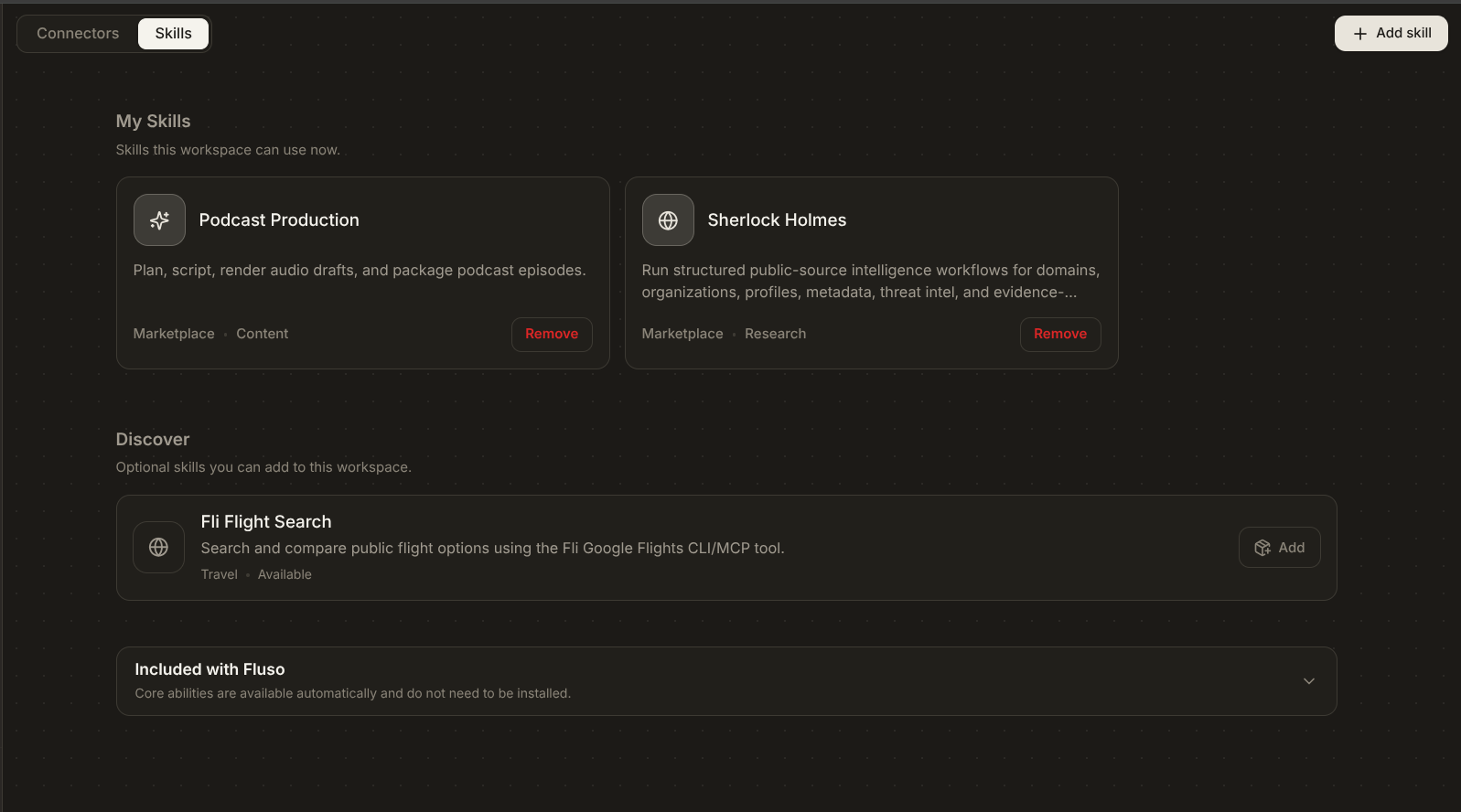
Open Plugins → Skills in the left sidebar. Three sections.
My Skills. Skills this workspace can use right now. Marketplace skills you have added and skills you have built with Fluso live here. Each card has a Remove button.
Discover. The skill marketplace, shown inline. One click to add. For the wider catalog, click Add skill at the top right and choose Browse marketplace.
Included with Fluso. The built-in core, organised into Communication, Planning, Research, Creation, and Developer tools. No Remove button. These are part of the product.
Inspecting a skill
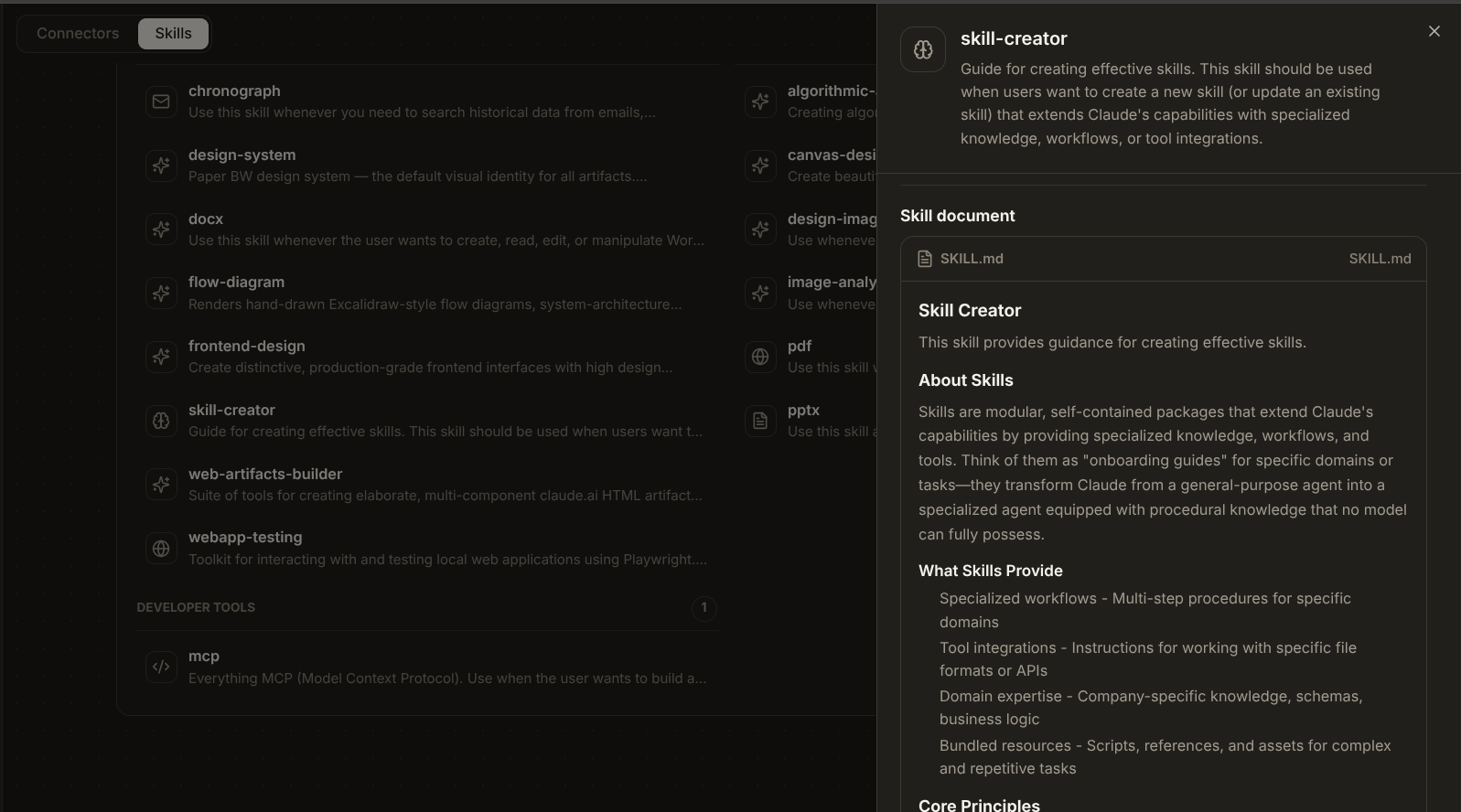
Click any card. A side panel opens with three sections.
Overview. What the skill does, in plain prose.
How to use it. Whether you need to add it first, and the kind of request that triggers it.
Skill document. The underlying SKILL.md. The exact instructions Fluso follows when the skill runs.
The skill document is view-only. To change what a skill does, build a new one.
Private enterprise skills
Private enterprise skills use two pieces:
SKILL.mdcontains the routing description and operating instructions.- An authenticated private MCP server keeps sensitive code and credentials, then exposes the operations the skill needs.
The server must expose a publicly reachable HTTPS Streamable HTTP endpoint. "Private" here means access-controlled, not a localhost or private-network address. The workspace or organization network-egress policy, plus any provider policy applied to that origin, must allow it.
Access follows the server's authentication and the workspace's MCP tool policy. Each tool's Allow, Ask, or Deny rule controls how calls proceed. Installing the skill does not override server access. See Apps & MCP to connect the server and set its tool rules.
This is a deployment pattern for teams that operate their own server. It does not make sensitive content inside SKILL.md private or provide a self-service secret store.
Adding from the marketplace
In Discover, find a skill that fits and click + Add. It moves into My Skills and is ready on the next message.
If you remove it later, it goes back to Discover. You can re-add it whenever.
Building your own
Click Add skill at the top right. A dropdown opens with Build with Fluso and Browse marketplace. Pick Build with Fluso.
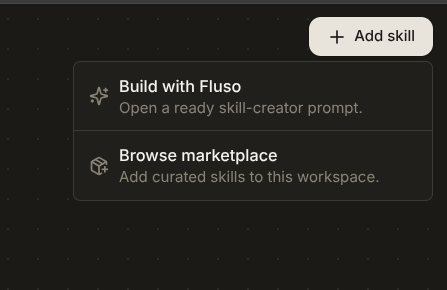
You land back on the chat dashboard with a prompt already filled in:
"Create a skill using skill-creator. First, ask what workflow it should handle."
Submit it. Fluso asks what workflow you want the skill to handle, what inputs it takes, what shape the output should have, and which tools or apps are involved. It writes the skill and adds it to My Skills.
You do not write code or markdown. The skill-creator skill does the writing for you.
A skill is worth building when the same task comes up in the same shape, often enough that re-explaining it gets annoying.
Removing a skill
Click Remove on a card in My Skills. What happens next depends on where the skill came from.
- Marketplace skill. Returns to Discover. You can re-add it whenever.
- Skill you built with Fluso. Permanently deleted. If you want it back, you build it again.
Next
For the patterns that make custom skills worth building, see Going deeper.